

chw42
Members
-
Joined
-
Last visited
Everything posted by chw42
-
Damn that's nasty
-
Big out. Bummer needs to keep that sinker away from Bregman.
-
Waino and AJ trying to jinx our bullpen.
-
How much longer are commercial breaks in the playoffs? Cause I think that's contributing to this game taking this long.
-
This is probably the biggest inning of the night. 234 due up against Bummer.
-
Cause that worked so well on Friday.
-
There's a chance there is no tomorrow if Kimbrel pitches the 8th tonight
-
Tepera sure has been a shot in the arm for this bullpen
-
Yup. He's catching it like it's a damn football. At least it looks like he's using two hands though.
-
Tepera got away with a hanger. I thought that had a chance to go.
-
lol it has to be. This is slower than Red Sox Yankees.
-
Because it did.
-
Eloy has been so disappointing since the start of September. There's something seriously wrong with his approach. He also hasn't been hitting fastballs he used to crush in the zone.
-
lmao he just did. Done it every time. What's funny is that he'll swing early in the count and then take a third strike looking.
-
Nice job working the count Yaz. Take notes Eloy.
-
Of course Jose gets hit. Make em pay Yaz
-
We really needed to score more in the 4th.
-
Why is Robert so confused at the plate? He didn't think he walked last time and now looked like he didn't know he just struck out.
-
That ball looked fair for a long time.
-
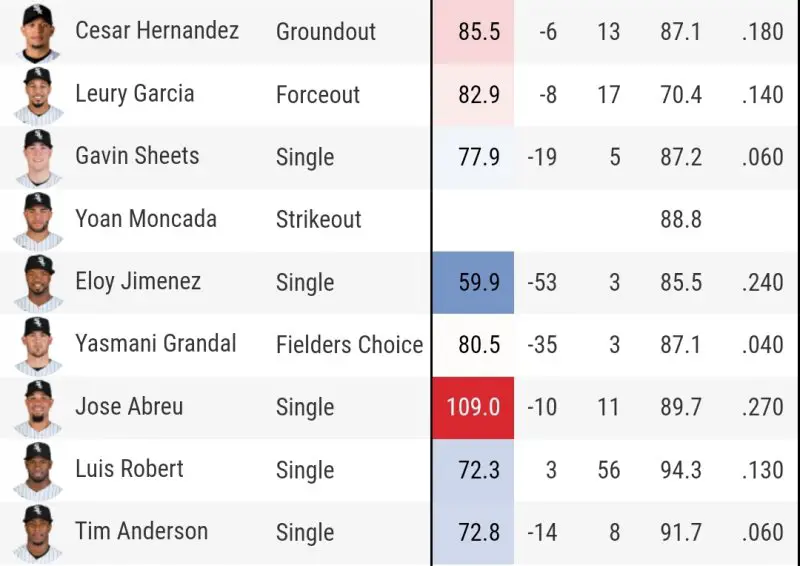
That bottom of the 4th is probably the luckiest inning we've had all year. Look at the exit velos and xBAs.
-
Holy shit a clean inning? No way.
-
With how much shit went our way that inning, 3 there is terrible.
-
Grandal being so slow actually worked to his advantage.
-
Here comes a choke from Cesar
-
I just said he wouldn't score on a single right before that. That was about as soft of a single as you can get and he still couldn't score.



