

Everything posted by kba
-
NexStar owns both WGN and the national CW network - though the Chicago CW affiliate, WCIU, is owned by Weigel. They all have a recent history of local sports programming, so it seems like there would be some opportunities here. There's no way that a free over-the-air station will pay the teams anywhere near the money that NBCSports pays in rights fees. But with RSNs failing all over the country, it makes sense for teams to pursue a multi-platform strategy for their telecasts - cable, streaming, and over-the-air TV. Make the games available as widely as possible and try to make more money on advertising.
-
Interesting. Wonder if WGN wants to start airing games again.
-
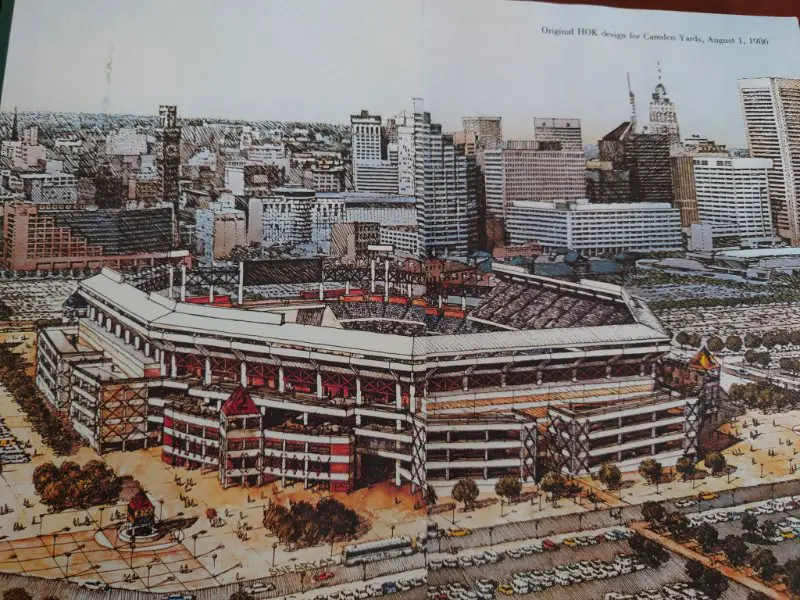
The Richmond book has the original 1986 HOK rendering for Camden Yards (below), which looks strikingly like New Comiskey - symmetric dimensions, steep upper deck, bleachers between the foul poles, decorative latticework in the outfield, and an exterior that's nothing but ramps. Maybe they showed the Sox this version, because it's pretty much what they built in Chicago. There's also a revised 1987 CY rendering that's essentially the same thing, but the warehouse is preserved in right field. It wasn't until 1988 that HOK began to add the retro features to Camden Yards. But New Comiskey was already under construction by then, so I'm not sure how Reinsdorf could have seen it and rejected it. I'll be curious to hear what your source says.
-
Lip, do you have the name of that book? Because I've been reading Peter Richmond's book Ballpark: Camden Yards and the Building of an American Dream, and he has a completely different story. Richmond portrays HOK at the time as specialists in generic stadiums such as Joe Robbie, Giants Stadium, and New Comiskey. He writes a couple chapters about how HOK was pushing the Orioles toward a Comiskey-like plan that demolished the warehouse. He says it was the Orioles and some local consultants who came up with the idea for the retro-design and had to persuade HOK to do it. He quotes Orioles president Larry Lucchino saying of HOK, "Comiskey would have been the stadium they'd have built, given free reign." You can read excerpts of Richmond's book here. I guess Richmond's take could be revisionist history, but I'm wondering where the story comes from that says HOK ever had a Camden Yards design for Chicago.
-
This is from 1986. Wonder if they've gotten past it: "Stadium insiders acknowledge that hard feelings exist between the owners of the Bears and the Sox. Some of those feelings stem from the $1.5 billion antitrust lawsuit filed by the U.S. Football League against the National Football League. Sox president Eddie Einhorn, who hopes to start a USFL team here, is among the plaintiffs and McCaskey among the defendants." https://www.chicagotribune.com/1986/06/16/bears-sack-mayors-stadium/
-
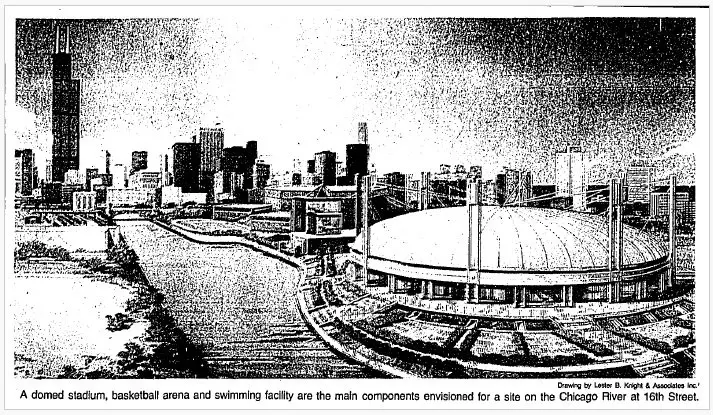
A drawing of the 1980's stadium plan at the 78 site is posted toward the top of this thread. It was the mayor's plan for a multipurpose domed stadium that looked like the Metrodome, not Camden Yards. The Sox actually were open to it, but the Bears said no, and the plan died.
-
Looks like the White Sox still haven't improved their baserunning fundamentals.
-
Not sure about the radio contract, but the Sox paid WSNS-TV to televise the games from 1973-1976. The Sox paid production costs and sold the advertising themselves. (WSNS had similar deals with the Bulls and the old Chicago Cougars hockey team.) That was a big drop-off from the Sox previous contract with WFLD, which had paid more than a million dollars a year to lure the Sox away from WGN in 1968.
-
Schriffen's baseball play-by-play: 2021 Little League World Series on ESPN:
-
... and he accepted it. But the city's offer was for a domed stadium shared by the Sox and Bears. And the Bears had no interest in it. https://www.chicagotribune.com/news/ct-xpm-1986-06-16-8602120949-story.html
-
This is the plan the city presented for the site in 1985. But the city said the financing would only work is if it was a multi-purpose stadium for the Sox and Bears. The Sox tentatively agreed to it, even though they preferred a baseball-only stadium. But the Bears didn't like the financial arrangements, so the plan fell apart. https://www.chicagotribune.com/news/ct-xpm-1986-06-16-8602120949-story.html
-
Here are some brief clips from 1980 (Jump ahead to 2:35) And a few more Ozzie starts a line-drive double play here (skip ahead to 1:10)




