
Leaderboard
-
77 Hitmen
Members6Points1,793Posts -
WhiteSox2023
Members1Points17,323Posts -
oldsox
Members1Points8,471Posts -
caulfield12
Members1Points109,256Posts

.thumb.jpg.1bfa21502c2c2825cb6fd525bc016063.jpg)
Popular Content
Showing content with the highest reputation on 10/21/2026 in Posts
-
I think you missed the joke based on an infamous Jerry quote. https://en.wikipedia.org/wiki/White_Flag_Trade2 points
-
I see what you did there.2 points
-
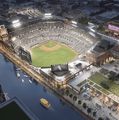
This came up in the new stadium thread. I thought it would be a good discussion among people here who have been to multiple MLB parks outside of Chicago to get everyone's thoughts, likes, dislikes, observations, etc. about other ballparks. I'd like to limit this to MLB ballparks only (past and present). Discussing stadiums in other leagues (including minor league baseball) will end up with apples to oranges comparisons. I've been to a dozen of the current MLB ballparks. I think it'd be too arbitrary for me to simply rank them 1 to 12. Instead, I'm going to give some general observations. I'm going to start off with the ballparks that I think are top-tier. Oracle Park: Nice ballpark, but location, location, location. The backdrop view is incredible and from the concourse, I got a great nighttime view of the Bay Bridge. The outfield concourse is pretty good too. I was able to take light rail from my hotel right to the park, so transit access was good in my experience. PNC Park: The best designed ballpark of all the parks I've been to. Nice simple layout with only 2 decks, great views of the field from the lower concourse (much better than at Rate Field) and great outfield concourse with a view out onto the Alleghany River. Food was really good with some local favorites: pierogis, Primanti Bros sandwiches, and a a concession stand operated by Manny Sanguillen. Backdrop is top-notch with the Clemente Bridge and the city skyline. Location is great with the riverwalk right there and downtown right across the bridge. I was able to walk from my downtown hotel to the ballpark. The area around the park seemed fine with some bars, restaurants, hotels, and residences, but it wasn't nearly as bustling as i've seen around other ballparks. Too bad the Pirates are so perpetually bad. This place could be electric if the organization could field a more competitive team. I think they've made the playoffs only 3 times (3 years in a row) in the 25 years since this place opened. Petco Park: I'd say this one is the best overall of the ones I've been too. Great ballpark. The backdrop isn't as stunning as the other two above, but the historic warehouse in the LF corner is a nice touch. There's a city park just beyond CF that is part of the gated ballpark area during games, but then it appears to be a public park all other times. Hard to beat that beautiful San Diego weather. Location is great in the Gaslamp District. Food was really good too. It's no surprise to me that the Padres draw 3M a year here. I was able to take light rail from my hotel in Old Town to the stadium, so again transit access was good for me.1 point
-
White Flag season/JR jokes…1 point
-
What are you talking about? If Sam catches that fly ball with 2 outs in the 9th, Sox finish ahead of Cleveland.1 point
-
This post needs more love.1 point
-
I used to go to the Club Level for years - before and after they enclosed/climate-controlled the concourse. Not every game I attended, but once in a while as a splurge and I thought it was worth it. While the food at the 100 level has always been good, the 300 level was just that much better. But then, IMO, the quality went downhill. It's not that the food was bad, but the food/experience wasn't really any better than the 100 level to be worth the extra cost and I haven't been there since Covid. I don't know if it's improved since then. They also didn't have enough tables and chairs such that it was often hard to find a seat in the concourse if the weather was bad. I went to the Club Level in at PNC Park and there were plenty of places to sit inside their larger concourse. Since the heat index was around 100 that evening, it was a good place to go in for a half inning to cool off and watch the game on a big screen TV before returning to my seat. Also, since the club level at PNC (Busch Stadium too) are bigger, I felt like I was still there with a sizable number of fans and I didn't feel as cut off from other fans as the 300 level at Rate Field.1 point
-
Gotta be one of the worst trades in MLB history.1 point
-
1 pointTurns out Getz wasn't wrong to get Booser, we just suck at developing pitching.1 point


This leaderboard is set to Chicago/GMT-05:00