


Everything posted by southsider2k5
-
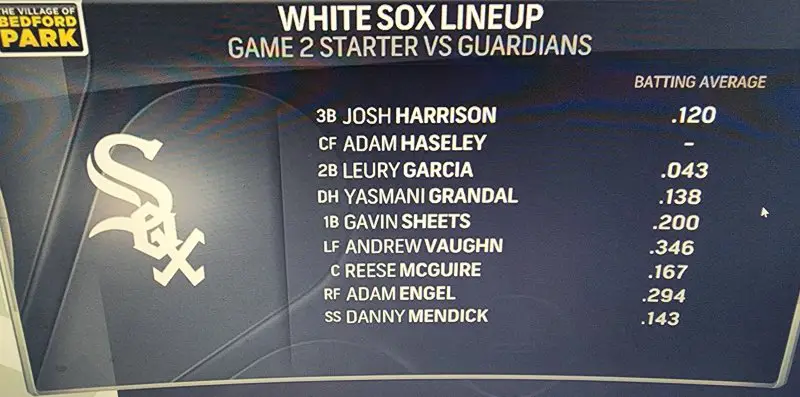
Ozzie called it a spring training line up.
-
Nice hat tip from Tony.
-
Our first four hitters have a COMBINED average of .301.
-
Why not, everybody else is.Yep, we are getting swept.Because Tony is benching most of them for Game 2.You are being suspended for fake news reporting.Banks has been a pen saver so far in this one.Sure. DK is taking pointers for who to blame from Soxtalk.It's one way of keeping his innings down.This. Keeping concentration and focus over that has to be nearly impossible.I know everyone wants to blame Dallas, but you essentially had 6 errors behind him and 3 outs. Kind of hard to pitch over that, or even keep your head in the game at that point.I think Steve just said it was a bad challenge by Tony, without actually saying it.Apparently the defense hates Dallas.We are getting swept today, aren't we?




Account
Navigation
Search
Configure browser push notifications
Chrome (Android)
- Tap the lock icon next to the address bar.
- Tap Permissions → Notifications.
- Adjust your preference.
Chrome (Desktop)
- Click the padlock icon in the address bar.
- Select Site settings.
- Find Notifications and adjust your preference.
Safari (iOS 16.4+)
- Ensure the site is installed via Add to Home Screen.
- Open Settings App → Notifications.
- Find your app name and adjust your preference.
Safari (macOS)
- Go to Safari → Preferences.
- Click the Websites tab.
- Select Notifications in the sidebar.
- Find this website and adjust your preference.
Edge (Android)
- Tap the lock icon next to the address bar.
- Tap Permissions.
- Find Notifications and adjust your preference.
Edge (Desktop)
- Click the padlock icon in the address bar.
- Click Permissions for this site.
- Find Notifications and adjust your preference.
Firefox (Android)
- Go to Settings → Site permissions.
- Tap Notifications.
- Find this site in the list and adjust your preference.
Firefox (Desktop)
- Open Firefox Settings.
- Search for Notifications.
- Find this site in the list and adjust your preference.