


southsider2k5
Admin
-
Joined
-
Last visited
Everything posted by southsider2k5
-
Pretty sure your pool is just an amalgamation of all your individual pick draft slots added up. If we pick 10th, we get the 10th slot. I can't see them having pushed someone to the 10th pick, but still giving them the 1st slot money, otherwise it is kind of meaningless to push them down because they can just load up later.
-
Is a lot of employees? How does it compare to others?
-
He's probably not selling while he is alive.
-
Not mention if we are going to try to act like the Vaughn and Benny play is such a big hit to this squad, you have to also look at the fact Garrett Crochet pitching like Cy Young and Fedde pitching like a #2 was even more unexpected to the upside. If we are going to talk about surprises with that team, we have had one of the best 1/2 punches in baseball and still are historically bad. I promise you no one planned for that either.
-
Been there, done that.
-
Literally last in baseball defensively. Pretty sure that isn't Eloy's fault.
-
It's not at all like that. On one hand you have 3 players who in their major league careers have missed 40 to 50% of their teams game played on an annual basis. On the other hand you have a national average of 12 deaths per 100,000 people or something with a 0.012% chance of happening in a given year to any one person.
-
Going to be that way for a while too.
-
That is quite literally his job. It is his job to know his roster and his players. If he didn't plan for the fact that all three of these players AVERAGE missing between 40 and 50% of every single major league season they have played into how to build this team, he doesn't deserve his job. That is 100% a part of assessing what any season will look like when you have these players on your roster. When the very thing that always happens, actually happens, you don't get to say darn it happened, and now that's why we are so bad. That is ridiculous.
-
I have seen mention of the Sox 1970 season more than few times this year.
-
Yeah, you don't get to claim that he "knew", yet use it as an excuse for failure. Competitive teams plan around these things. The Dodgers are loaded with half season players, but they are so deep they can work around it. What you are describing is building your house in a uninsurable hurricane zone, but then blaming the hurricane for tearing your house down, even though you knew full well it would happen. If your plan is building sand castles on the beach, you are planning for failure.
-
Again if Chris Getz didn't know that the three guys that typically miss half of a season were going to get hurt, and could all be hurt at the same, he shouldn't be a major league GM. You get push back over pushing some bizarre narrative over shutouts that doesn't actually change anything of the situation on the ground, which is that this is a historically bad team. The attempt to connect it to markers of how bad this season is as if people are enjoying this mess is exactly why you get push back for trying to tell people how they should feel about this season. Fans are upset and justifiably so. I am not sure why you take that so personally that you feel the need to personally attack the people who disagree with you on it, but it is what it is. And until the situation on the ground materially improves, this is the way Sox fans are going to be.
-
The Sox were not a couple of players away from anything except 100 losses instead of 120. This roster was trash from day 1.The funny thing is attendance will be down thousands per game again next year, yet they may well have their most profitable year ever.Also this
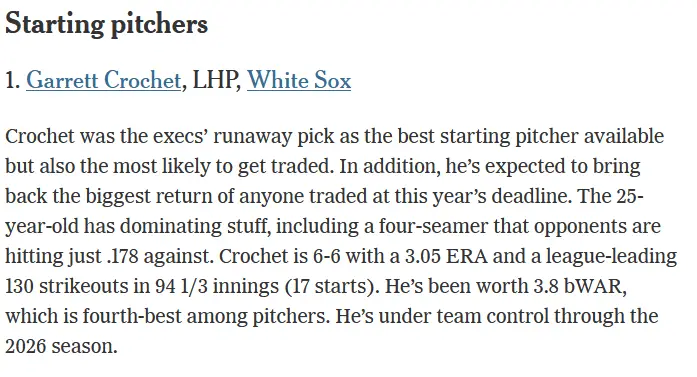
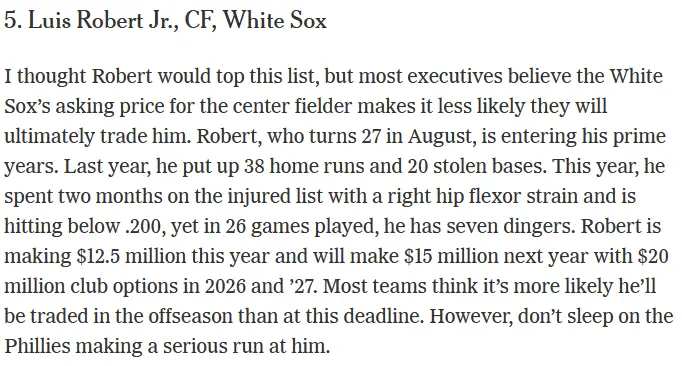 Crochet #1 on the most likely to be traded SP list. https://www.nytimes.com/athletic/5591788/2024/06/26/mlb-trade-deadline-predictions-crochet-chisholm/?source=emp_shared_article
 Welcome to 2021Betting odds going into that season had them 3rd best. https://sportsbookwire.usatoday.com/2021/03/15/2021-chicago-white-sox-world-series-win-total-pennant-and-division-odds/ There are lots of individual articles out there going into the season and all of them mention the Sox in some form.The Orioles still need a decent amount of front line pitching. Honestly, this got lost in all of the mess with the immigrant O's fans, but there was definitely a camp of us who felt that Baltimore has enough talent, but needed to rebalance their roster pitching-wise to be able to make that run, and that they needed to either trade for it, or sign it, because it wasn't in the system, and if they f*** around, they might just find out, and miss their window.This is dumpster fire of lack of information, projections, whatabouts, and whatifs that isn't worth taking seriously.






Account
Navigation
Search
Configure browser push notifications
Chrome (Android)
- Tap the lock icon next to the address bar.
- Tap Permissions → Notifications.
- Adjust your preference.
Chrome (Desktop)
- Click the padlock icon in the address bar.
- Select Site settings.
- Find Notifications and adjust your preference.
Safari (iOS 16.4+)
- Ensure the site is installed via Add to Home Screen.
- Open Settings App → Notifications.
- Find your app name and adjust your preference.
Safari (macOS)
- Go to Safari → Preferences.
- Click the Websites tab.
- Select Notifications in the sidebar.
- Find this website and adjust your preference.
Edge (Android)
- Tap the lock icon next to the address bar.
- Tap Permissions.
- Find Notifications and adjust your preference.
Edge (Desktop)
- Click the padlock icon in the address bar.
- Click Permissions for this site.
- Find Notifications and adjust your preference.
Firefox (Android)
- Go to Settings → Site permissions.
- Tap Notifications.
- Find this site in the list and adjust your preference.
Firefox (Desktop)
- Open Firefox Settings.
- Search for Notifications.
- Find this site in the list and adjust your preference.