

DirtySox
Members
-
Joined
-
Last visited
Everything posted by DirtySox
-
Now Norby takes one out. What a nutty one through four for Norfolk. Holliday, Norby, Kjerstad, Mayo. Jelly.
-
Man. Holliday is just nuts. HR.
-
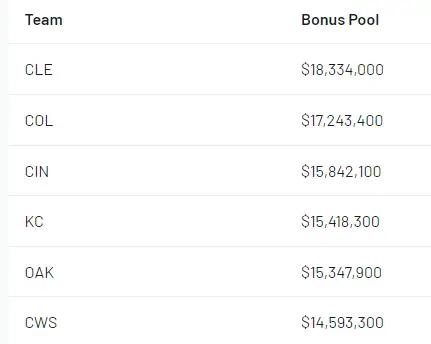
Draft bonus pools/slot values are out. Slot value for the 5th pick is $7,763,700. https://www.baseballamerica.com/stories/2024-mlb-draft-bonus-pools-slot-values-for-each-team/
-
Oh it's a Colson/Holliday matchup. Nice.
-
10 Prospects who Impressed on the Arizona backfields. Eder hype rising? https://www.baseballamerica.com/stories/10-mlb-prospects-who-impressed-on-the-arizona-backfields/
-
-
Via BA.
-
-
Law really likes Condon. I actually had no idea he had been playing CF this year. Though it sounds like corner OF or 3B will be his home eventually. https://theathletic.com/5382181/2024/04/01/charlie-condon-2024-mlb-draft-scouting/I mean if they are attempting to become even more of a laughingstock, have at it.They wouldn't. Please tell me they wouldn't.I don't have audio on since I'm working out. Did homie forget the count or was he just showing up the ump? I was perplexed.No. He's still playing. He fouled a nasty pitch right off his shin.That looked painful.DeDong!I mean, lot of us folks thought it was a questionable trade from the start. Especially those of us who have actually watched Mena pitch. That being said it's been 3 freaking games. Let it breathe.Eloy hurt again eh.I thought Canha was sort of apologizing for making contact. Could be wrong.Yikes.




Account
Navigation
Search
Configure browser push notifications
Chrome (Android)
- Tap the lock icon next to the address bar.
- Tap Permissions → Notifications.
- Adjust your preference.
Chrome (Desktop)
- Click the padlock icon in the address bar.
- Select Site settings.
- Find Notifications and adjust your preference.
Safari (iOS 16.4+)
- Ensure the site is installed via Add to Home Screen.
- Open Settings App → Notifications.
- Find your app name and adjust your preference.
Safari (macOS)
- Go to Safari → Preferences.
- Click the Websites tab.
- Select Notifications in the sidebar.
- Find this website and adjust your preference.
Edge (Android)
- Tap the lock icon next to the address bar.
- Tap Permissions.
- Find Notifications and adjust your preference.
Edge (Desktop)
- Click the padlock icon in the address bar.
- Click Permissions for this site.
- Find Notifications and adjust your preference.
Firefox (Android)
- Go to Settings → Site permissions.
- Tap Notifications.
- Find this site in the list and adjust your preference.
Firefox (Desktop)
- Open Firefox Settings.
- Search for Notifications.
- Find this site in the list and adjust your preference.