

Sleepy Harold
Members
-
Joined
-
Last visited
Everything posted by Sleepy Harold
-
He's been in the field more regularly since Mid-June. He did lots of exclusive DHing early in the season. It seems like now they're giving him a start at 2B, then DH the next day, start at 2b, DH, etc. For the season he has 39 games at DH, 19 at 2B and 1 at 3B. He is learning a new position this year, moving from 3B to 2B, so maybe they were working on stuff early in the year and easing him into it now (speculating here)?
-
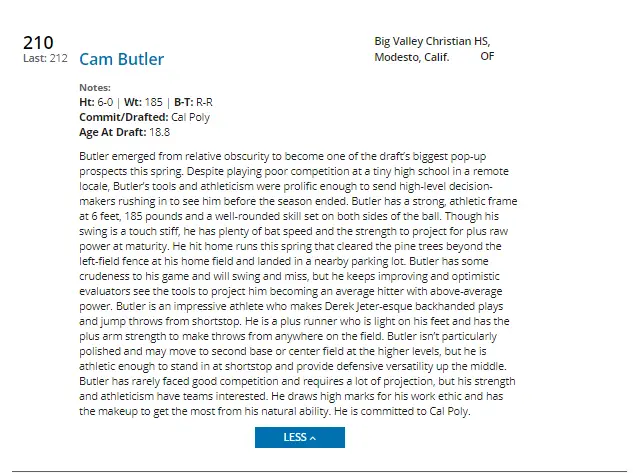
Kind of slid under the radar, but the Brewers took a 28 year old in the last round.a no hitter for the Angels!Hey Will Taylor off the boardHS OFer Cameron Butler taken. #210 on BAs Top 500.
 This is the link to watch the livestream in case anyone is interested https://www.mlb.com/video/day-three-of-2021-mlb-draft-3151It's gotta be that, otherwise his fall doesn't make much sense at all.And Cease's FG page says he's greatly improved this year.CeAsE sUcKsIf any pitcher has a bad start they're trash and must be thought of as such by the industry and sold for scraps. I get being a contrarian, but like, dude.It's a thought, mostly a dumb one. Joc has been bad this year, and in no way costs Cease+.Although this is just a proposal from a caller on the Score, it's comically bad and figured it should be shared if anyone is looking for a good laugh this afternoon.
Account
Navigation
Search
Configure browser push notifications
Chrome (Android)
- Tap the lock icon next to the address bar.
- Tap Permissions → Notifications.
- Adjust your preference.
Chrome (Desktop)
- Click the padlock icon in the address bar.
- Select Site settings.
- Find Notifications and adjust your preference.
Safari (iOS 16.4+)
- Ensure the site is installed via Add to Home Screen.
- Open Settings App → Notifications.
- Find your app name and adjust your preference.
Safari (macOS)
- Go to Safari → Preferences.
- Click the Websites tab.
- Select Notifications in the sidebar.
- Find this website and adjust your preference.
Edge (Android)
- Tap the lock icon next to the address bar.
- Tap Permissions.
- Find Notifications and adjust your preference.
Edge (Desktop)
- Click the padlock icon in the address bar.
- Click Permissions for this site.
- Find Notifications and adjust your preference.
Firefox (Android)
- Go to Settings → Site permissions.
- Tap Notifications.
- Find this site in the list and adjust your preference.
Firefox (Desktop)
- Open Firefox Settings.
- Search for Notifications.
- Find this site in the list and adjust your preference.



