

-
Someone get Vargy out of uppercut mode please.
-
Less than idea situation currently.
-
Hard to believe Drew Romo is still on a MLB roster, much less one of a 1st place team.
-
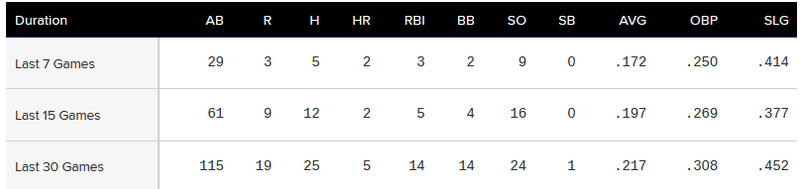
Vargas has uppercut his BA all the way down to .237 now, after getting up to .252. L7/15/30 is pretty yucky:
-
Yeah, much better to hear JR for the last 45+ years, minus an aberration. Am I right?
-
Boston is a catcher in name only, and is now in organization 3, in his first season. Something HAD to be offered besides money, and like others said, up until 2026, Castillo has been pretty damn good. We get rid of 10 mil from Seranthony in 2027 (if there is even a season), so 14 mil net and a 'maybe' catcher, for a guy with Castillo's history sans 2026 is well worth it.
-
Great offensive effort, boys.
-
14 K's today, this offense seems way too jeckyl and hide still.
-
Is there a reason we're not swinging the fucking bat, Sam?
-
Love the old Devil Ray unis
-
That sinker is doing some filthy things.
-
I felt like Rassmussen was going to be tough, but not '0 runs in 7 innings' tough.
-
I was about to type exactly the same thing. Wolkow, I'm fine moving but with our catching issue right now, no to Boston Smith.
-
His shaky medical situation would make most teams second guess on a huge package, I'd think, too.
-
I wonder what Hunter Greene is going to cost someone, if he gets moved. Still feels like this year, the 4 start SSS, is the exception and not the norm.




