

chitownsportsfan
Members
-
Joined
-
Last visited
Everything posted by chitownsportsfan
-
Honestly I think Getz just spamming the "im p****" meme at other GMs might get the best deals.
-
That's good news, here I was worried we'd be asking for "bottom prospects".
-
Well if 1/3 of these guys turn into average regulars I'll be thrilled and we'll still be a 75 win team in 2028.
-
Torpedo boat!
-
I think it's more to do with flight times and the diaspora. A direct flight back to Tokyo from Seattle or LA is doable once a week in the offseason or so. It's a lot harder making connections and adding flight miles from anywhere else they play baseball in the US.
-
It's morning in America and in Sox fandom. FML.
-
We're gonna win so much we're gonna get sick of winning.
-
Fair. I probably would as well but it would make perfect sense to go from JR to the Ishbia bros. Devil you don't know is better than the one you do but they have a really bad record as decision makers in sports.
-
Ishbia bros are scum bags and bad owners. Look what they did to Phoenix. I hate being a fan of the White Sox.
-
White Sox coaching and suck breaks the ability of statistical models. We're not going to put up 13 fWAR from position players. I'd be shocked if we put up 10. Go ahead and save this post. I'll eat crow if I'm wrong.
-
That's about where I think the default outlook should land. We are clearly in "show me" phase of Getz's grand plan. He gets 2 more years in most orgs, in JR's he might get two more decades.
-
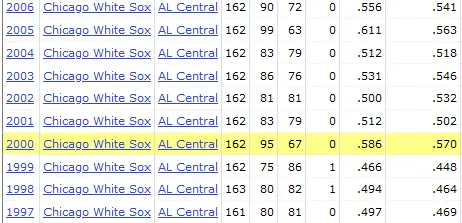
What in god's name are you talking about? Were you old enough to watch those teams? They never "rebuilt" anything. They just kept doubling and tripling down on the plan to win roughly 80 games and then they caught lightning in a bottle in 2005 (bless them for it) and then added a ton of talent for 2006 but completely collapsed as the pitching reverted back out of once every 50 years type lightning in a bottle. Look at the actual records but also the pythags from the time period in question (far right column). Basically it was a team that bounced around the expected variation in a .500 team on paper. There was no rebuild. They never sold off vets and turned them into prospects. They just kept being content with being average and got really fucking lucky with almost literally their entire pitching staff having a career year. As we saw immediately after the WS run, there was no secret sauce. On paper the 2006 team was much better, but of course regression happened hard and then reality hit for the next 7-8 years that the org was in decline. This of course culminated in the Hahn rebuild. @WestEddy if you're gonna throw down internet stickers instead of articulating any sort of argument for your position you're even sillier than I thought. Here's a simple test: did ANY SOX FAN AROUND AGE 35-60 ON THIS FORUM HEAD INTO THE 2005 SEASON THINKING THIS IS OUR WS YEAR? Of course fucking not. Because there was no rebuild, there was no "contention window" it was just muddling along on the tail end of Frank's career, making profits for JR, and hoping KW could eventually pull something out of his ass with his trades and "80 cent on the dollar" type FA moves.
-
There is zero evidence the guy responsible for bottoming out in historic fashion is capable of creating any of that. Everything in your post requires excellence. We don't even have evidence that Getz is competent, let alone excellent. I honestly cannot fathom posting that, it's just wishcasting. You've watched the JR White Sox for your entire life, right?
-
I wouldn't quite go that far but if you look at his swing from when he came in to what it was most of last year it's like what the f*** did they have this guy working on. Not only did they manage to introduce a looping load mechanism they also altered his approach it appears so that he never, ever really goes into an AB looking to pull first pitch fastball and hit it hard. It's like they tried to turn him into a different profile hitter. Obviously the player bares a lot of the blame as well but our coaching sucks and guys regress all the time.
-
I don't care if he was getting paid a dollar. He's not worth a single fucking cent to this team. Maybe he has value as the wrong side of a platoon on a team that is so loaded they can carry a RH DH on the occasional need for a pinch hitter. The amount of money this sad sack team has spent on worthless players when they could have spent the same on fewer actual good players is mind boggling. No matter how many times they get burnt, they just keep on doing the same.
-
It's not mutually exclusive, that's what limited minds want to think I guess. Like no org is using only metrics or only in person scouting. It's always a blend. This article feels quite dated, like something that would have come out 20 years ago during the start of the Moneyball consciousness. We are long past this point in the evolution of evaluating players.
-
Usually around this time I start to get excited for the new season and fire up the spring training count down page. Pitcher and catchers report in only 36 days. I DGAF. Thanks Jerry!
-
let's not bury the lede there in your presentation councilor: Gavin sheets 2nd to last. He didn't just "happen to be there" this dumbfuck org put him there, quite literally!
-
The "slugger" hit for a wRC+ of 113 in the OF. He's below 100 at 1B. Maybe the "slugger" should pickup that OF glove again. He's a staggering -70 (-7 WAR roughly) runs below average as a "fielder". But a DH that hits league average isn't a MLB player. I'm not even really arguing with you. I just can't stand this bum. We have a lot of bums.
-
ZIPS, which is usually weighted a bit more conservatively, had them at 14! 😂 Couldn't find an easy STEAMER projection.
-
And we have the last two decades of White Sox institutional failure weighing everything down. We ain't exactly known as a draft and develop franchise.
-
Tork and Vaughn, the bust bros.
-
Steamer is weighted towards old performance too much for my liking. We'll see what ZIPS says. We finished with negative 6.3 fWAR last year. I don't see us magically gaining 20 fWAR in regression to the "mean". The mean has changed and the true talent of guys like Robert and Benintendi has dropped. Just one example, Steamer thinks Andrew Vaughn is a 1.2 fWAR player. Now I would take the under on that next year. Dude has been worth -.5 fWAR over his career.
-
Exactly. If you think we have 7 wins coming in "positive regression" well subtract 5 right off the bat as well. +2 net. Plus we're going to have a horrific bullpen so we are likely to under perform pythag again.
-
I'm not seeing any reason to take the over. We've signed nobody and lost our best player. Who exactly is a big bounce back contender? We're utter trash. Chicago sports is pathetic.





